


Dear friends this is the common problem everyone facing while designing their website with beautiful and attractive javascript animation. you will see the problem when you preview your web design in your browser. your css drop down menu displays behind javascript animation. This is very simple problem if your css drop down menu goes behind the javascript animation you don't have to worry at all. i am going to show you how it is possible to bring your css drop down menu infront of javascript animation.
Before i give you solution you must have knowledge of z index:
Understanding z index: z index is a CSS property that sets the stack order of specific elements. An element with greater stack order is always in front of another element with lower stack order. i hope now you understand what is z index.
now here is the solution to display you css drop down menu infront of javascript animation.
1. you just have to add the z-index code and your drop down menu will display infront of your animation.
2. you may get confused where to put z index code and how to put z index code to show your drop down menu in front of your animtion.
3. don't worry its very simple. i am going to show you step by step.

4. you can see above in the image there is css drop down menu displaying behind the javascript animation. i am showing you this image because i also face the same problem while designing my website. i hope it will help you better to understand.
5.now i am showing you the code of above css drop down menu image.

you can see above highlighted three menu is not displaying infront of animation. now i am going to show you in next step to bring your menu in front of animation.
6. you just need to add this code style="z-index:10000". and your probelm is solved. u can change the value of z index according to your need. again you may confuse where to put this z-index code. dont worry i will show you in next step
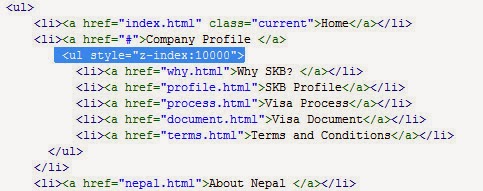
7. you have to add this code inside <ul> tag like this <ul style="z-index:10000">. again you may get confused because you may see so many <ul> tag in your web design code. To find the right <ul> tag may be challenge for you. dont worry its simple. you have to add your z index code exactly where it is going behind the javascript animation.
8. i will show you image also look below. there you can see with highlighted with blue color. now i hope you will understand where to put exactly.
Now your animation should look like below image. there you can see you drop down menu is displaying infront of animation.

10. i hope this will help you to solve the problem
Before i give you solution you must have knowledge of z index:
Understanding z index: z index is a CSS property that sets the stack order of specific elements. An element with greater stack order is always in front of another element with lower stack order. i hope now you understand what is z index.
now here is the solution to display you css drop down menu infront of javascript animation.
1. you just have to add the z-index code and your drop down menu will display infront of your animation.
2. you may get confused where to put z index code and how to put z index code to show your drop down menu in front of your animtion.
3. don't worry its very simple. i am going to show you step by step.
4. you can see above in the image there is css drop down menu displaying behind the javascript animation. i am showing you this image because i also face the same problem while designing my website. i hope it will help you better to understand.
5.now i am showing you the code of above css drop down menu image.
you can see above highlighted three menu is not displaying infront of animation. now i am going to show you in next step to bring your menu in front of animation.
6. you just need to add this code style="z-index:10000". and your probelm is solved. u can change the value of z index according to your need. again you may confuse where to put this z-index code. dont worry i will show you in next step
7. you have to add this code inside <ul> tag like this <ul style="z-index:10000">. again you may get confused because you may see so many <ul> tag in your web design code. To find the right <ul> tag may be challenge for you. dont worry its simple. you have to add your z index code exactly where it is going behind the javascript animation.
8. i will show you image also look below. there you can see with highlighted with blue color. now i hope you will understand where to put exactly.
Now your animation should look like below image. there you can see you drop down menu is displaying infront of animation.

10. i hope this will help you to solve the problem
Thank you.


